
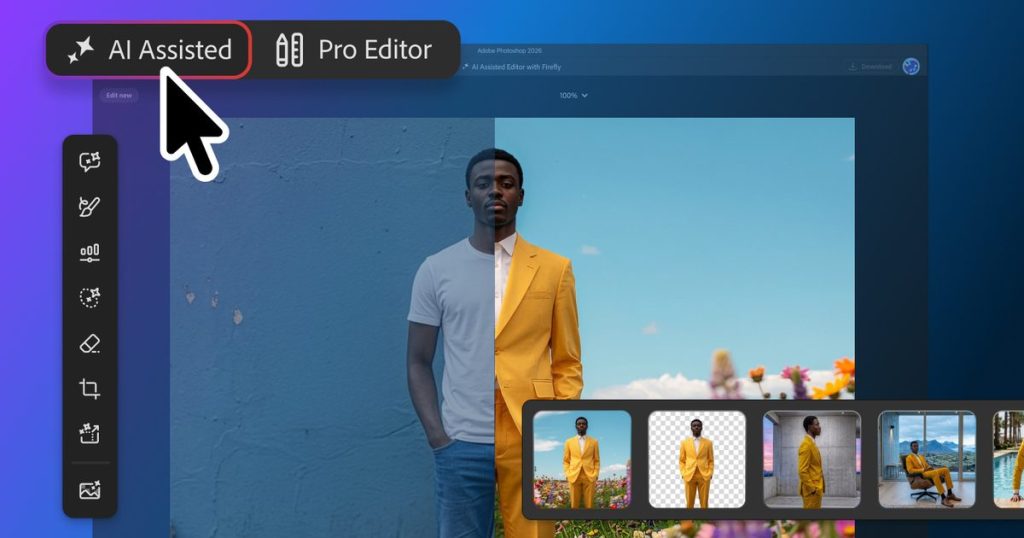
Navigating complex menu systems and manual selection tools in photo software has long presented a steep learning curve for non-designers. Adobe is addressing this barrier by launching a new beta workspace focused entirely on conversational, prompt-based image manipulation.
Direct Summary: Adobe’s new AI Assisted Editor introduces a natural-language interface to Photoshop, enabling users to perform complex image adjustments using text prompts and visual markups. Powered by Firefly Image 5, this update offers non-destructive generative workflows for both novice creators seeking simplified controls and experienced editors requiring accelerated routines.
Inside the AI Assisted Editor Workspace
The AI Assisted Editor serves as a dedicated workspace designed around a central natural-language prompt bar. Instead of manually isolating subjects or setting up complex adjustment layers, users can describe their intended outcome in plain text and allow the underlying engine to process the setup.
This streamlined interface does not replace the classic Pro Editor. Instead, it provides an alternate entry point for creators who prefer text instructions over manual pixel editing. Core tasks like background removal, image extension, and content generation through Generative Fill can all be executed directly from prompt inputs.
A central feature within this interface is Prompt to Edit, which transforms entire images without requiring initial manual selections. When triggered via the Contextual Task Bar, Photoshop organizes each generated variation onto its own generative layer, keeping modifications entirely non-destructive.
Precision Generative Control with Firefly Image 5 and Markup
To address common accuracy issues in AI image generation, Adobe has introduced targeted controls that restrict modifications to specific areas of a composition.
The Instruct Edit with Masks feature, powered by the Firefly Image 5 model, evaluates the contextual details of the full canvas while limiting edits strictly to a masked region. For instance, users can adjust micro-expressions—such as opening closed eyes—without altering surrounding facial features or background lighting.
Complementing this text-driven control is the new Markup tool. Creators can draw directly over specific regions of an image to indicate where elements should be added or modified. This visual guidance gives artists finer control over layout and placement during generative editing sessions.
Key New Features in Photoshop
| Feature Name | Tool Category | Core Capability |
|---|---|---|
| AI Assisted Editor | Workspace (Beta) | Prompt-first interface for text-based image creation and basic edits. |
| Prompt to Edit | Generative Tool | Modifies entire compositions without requiring manual object selection. |
| Instruct Edit with Masks | Precision AI (Firefly 5) | Applies prompt instructions strictly inside masked regions with full scene context. |
| Markup Tool | Visual Input | Allows direct canvas sketching to guide location-specific generative edits. |
| Light Adjustment Layer | Core Layer Engine | Enables non-destructive tuning of scene exposure, contrast, and highlights. |
Non-Destructive Tools Added to the Core Editor
Traditional workflows inside the main Pro Editor are also receiving functional enhancements alongside the AI features. A dedicated Light Adjustment Layer brings non-destructive tone, exposure, and contrast settings into standard layer stacks.
Typography handling has been expanded with Dynamic Text support across custom shapes and vector paths. Additionally, Adobe has integrated a dockable Stock panel, granting direct access to more than 900 million licensed stock assets without requiring users to exit the application window.
Frequently Asked Questions
Is the classic Photoshop interface being replaced by the AI editor?
No, the standard Pro Editor remains fully intact. The AI Assisted Editor operates as an optional beta workspace intended to give users a prompt-first alternative for executing edits without interacting with complex manual menus.
How does Prompt to Edit prevent permanent image damage?
Photoshop places all outputs generated via text prompts or the Contextual Task Bar onto separate generative layers. This keeps original pixel data intact and allows users to modify or delete generated elements at any time.
What makes Firefly Image 5 masked editing more precise?
Instruct Edit with Masks analyzes surrounding lighting, textures, and geometry, but strictly confines changes to the user’s defined mask. This prevents accidental modifications to unaffected regions of the canvas.