
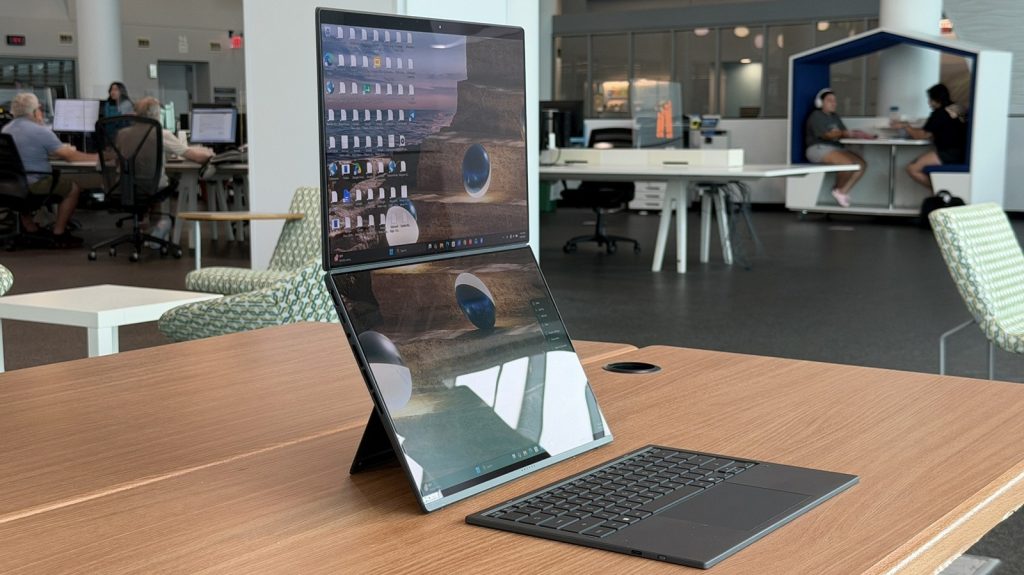
Working across multiple monitors on the road used to mean lugging around fragile external displays, extra power cables, and makeshift stands. The 2026 Asus Zenbook Duo solves this mobile productivity headache by integrating two full-sized 14-inch OLED displays into a single cohesive chassis equipped with a built-in kickstand and a detachable Bluetooth keyboard.
This comprehensive review covers the 2026 Asus Zenbook Duo, detailing its updated display hinge, performance specs, real-world battery endurance, and ergonomics. Designed primarily for remote professionals, software developers, and content creators, this twin-display workstation delivers uncompromised multitasking power in a package weighing under four pounds.
Asus Zenbook Duo (2026) Specifications Overview
| Component / Feature | Specification Details |
|---|---|
| Primary Displays | Dual 14-inch Lumina Pro OLED panels |
| Processor | Intel Core Ultra 9 |
| Memory & Storage | 32 GB RAM / 1 TB PCIe SSD |
| Weight | 3.64 lbs (1.65 kg) |
| Chassis Material | Ceraluminum alloy construction |
| Included Accessories | Detachable magnetic keyboard, active stylus, stylus charger, protective sleeve |
| Ports & Connectivity | 1x HDMI, 1x USB-A, 2x USB-C (Thunderbolt / Power Delivery), 3.5mm audio jack |
| Retail Price | $2,699 USD |
Refined Hinge Engineering and Chassis Build
Previous dual-screen laptops often felt experimental, requiring odd offsets or separate folios to store the physical keyboard. The 2026 Zenbook Duo replaces legacy hinge mechanics with a sleek “hideaway hinge” that allows both 14-inch panels to sit flush alongside one another when unfolded. While a thin central bezel remains visible between the screens, the continuous layout creates a significantly cleaner visual workspace.
The exterior body utilizes Asus’s custom Ceraluminum alloy, keeping the overall system weight down to 3.64 pounds. A sturdy kickstand remains integrated directly into the base plate, allowing the laptop to be set up upright without needing additional accessories. Though the integrated stand adds slight thickness to the lower deck, it enables instant deployment on any flat surface.
Display Versatility and Ergonomic Modes
The twin 14-inch Lumina Pro OLED panels provide massive screen real estate for high-density workflows. Users can split content across four distinct application windows—two per screen—or extend single documents across both panels. The narrow gap between the displays makes cross-screen navigation intuitive, even if full-canvas image viewing remains slightly broken by the central bezel.
The built-in kickstand supports both landscape and portrait orientations. Rotating the system vertically creates a side-by-side dual portrait setup, which works particularly well for software developers and data analysts who need to view long lines of code or complex spreadsheets simultaneously.
Keyboard Mechanics and Active Stylus Integration
Flexibility lies at the core of the keyboard layout. Users can magnetically dock the keyboard directly onto the bottom display to transform the device into a traditional laptop mode for tight spaces, such as airplane tray tables or vehicle lap use. When working on a desk, detaching the keyboard activates its wireless Bluetooth mode, leaving both displays completely open.
The keyboard key switches offer comfortable key travel and crisp tactile feedback. White key backlighting comes standard, ensuring late-night typing remains strain-free. Included in the package is an active stylus with standard right- and left-click control inputs, alongside a specialized charging cradle that fits into the bundled sleeve alongside the laptop.
System Performance, Ports, and Battery Life
Under the hood, the review unit packs an Intel Core Ultra 9 processor, 32 GB of system memory, and a 1 TB solid-state drive. Physical port selection remains complete, featuring a full-sized HDMI port, one legacy USB-A port, two high-speed USB-C ports with display output and charging capabilities, and a 3.5mm headphone jack.
Biometric authentication relies on facial recognition via an FHD webcam alongside Asus presence detection sensors. However, the top bezel lacks a physical camera privacy shutter and a fingerprint reader. Audio delivery is handled by robust internal speakers that maintain crisp mid-range clarity for video conferencing and media playback.
Battery endurance stays solid despite driving dual OLED screens. Real-world testing yields a full eight-hour workday on a single charge during moderate productivity tasks. Intermittent usage patterns allow the laptop to survive multi-day trips without requiring constant connection to a wall outlet.
Software Suite and Personalization Options
System monitoring is controlled through the built-in MyAsus utility. This centralized control panel provides quick insight into CPU utilization, RAM consumption, drive health, and battery charge thresholds. Advanced display settings allow users to adjust screen refresh rates, fine-tune color accuracy profiles, and tweak PWM dimming frequencies to reduce visual fatigue.
For creative media management, the software loadout includes StoryCube software. This tool uses local AI organization features to index photo libraries, categorize video assets, and compile automated media highlight clips without offloading personal data to external cloud servers.
Pricing and Target Audience Verdict
At $2,699 as tested, the 2026 Asus Zenbook Duo represents a premium investment. While traditional laptops paired with secondary portable USB monitors are cheaper, that alternative setup demands extra cables, separate mounting hardware, and additional battery draw.
For mobile professionals whose daily output relies heavily on multi-monitor research and writing, the refined single-chassis design justifies the entry price. Buyers who only require a single screen for basic tasks will find better value in lighter, conventional ultrabooks, but for true dual-screen productivity on the go, this model stands out as the standard to beat.
Frequently Asked Questions
How long does the battery last on the 2026 Asus Zenbook Duo?
The laptop delivers approximately eight hours of continuous work on a single charge when operating both OLED screens simultaneously. Power management settings within the MyAsus software can extend battery life further during light workloads.
Can the detachable keyboard be used while disconnected from the laptop?
Yes, the keyboard automatically switches to a low-latency Bluetooth connection as soon as it is removed from the magnetic lower display deck. It features a built-in rechargeable battery and full key backlighting in wireless mode.
Is the Zenbook Duo usable without an external desk or table?
The keyboard can be magnetically snapped over the bottom display, converting the system into a traditional clamshell laptop. This mode allows stable operation directly on your lap or inside cramped vehicles.