
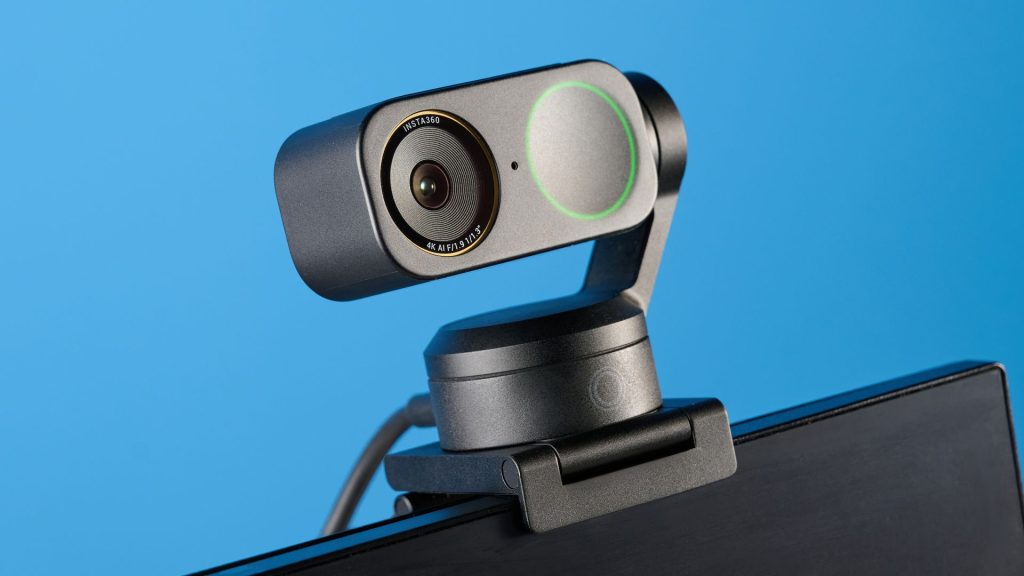
Relying on an integrated laptop lens often leaves your video feed looking dark, grainy, and washed out during critical meetings or broadcasts. Upgrading to a dedicated external camera delivers immediate gains in resolution, color accuracy, lighting adjustment, and framing flexibility.
This review details the top 10 webcams evaluated through hands-on testing across image crispness, low-light handling, frame rates, and sound capture. Covering options from budget 2K models to advanced 4K PTZ shooters and conference room rigs, this guide helps remote professionals, gamers, and content creators select the ideal camera for their setup.
Webcam Comparison: Top Models at a Glance
| Model | Best For | Max Resolution | Field of View | Microphones |
|---|---|---|---|---|
| Insta360 Link 2C | Best Overall | 4K @ 30 fps | 79.5° | 2 (AI Noise-Canceling) |
| Anker PowerConf C200 | Best Budget | 2K (1440p) @ 30 fps | 95°, 78°, 65° | 2 (Stereo) |
| Obsbot Tiny 3 | Best Premium PTZ | 4K @ 30 fps / 1080p @ 120 fps | 82.4° | 3 (Spatial Array) |
| Razer Kiyo V2 | Best for Streaming | 4K @ 30 fps / 1080p @ 60 fps | 93° | 2 (Omnidirectional) |
| Insta360 Link 2C Pro | Best for Professionals | 4K @ 30 fps / 1080p @ 60 fps | 83.9° | 2 (Beamforming) |
| Elgato Facecam MK.2 | Best for Gamers | 1080p @ 60 fps / 720p @ 120 fps | 84° | None (Requires External Mic) |
| Obsbot Meet Flip | Best for Laptops | 4K @ 30 fps | 72° | 1 (Intelligent Dual-Mic) |
| Logitech MX Brio 705 | Best Logitech | 4K @ 30 fps / 1080p @ 60 fps | 65°, 78°, 90° | 2 (Beamforming) |
| Obsbot Meet 4K | Best Compact 4K | 4K @ 30 fps / 1080p @ 120 fps | 86°, 78°, 65° | 2 (Omnidirectional) |
| Insta360 Connect | Best for Conference Rooms | 4K @ 30 fps | 110° | 14 (Beamforming Array) |
Detailed Reviews: The Top 10 Webcams
1. Insta360 Link 2C — Best Overall
The Insta360 Link 2C offers remarkable image quality at a price point that undercuts much of the 4K competition. Pushing sharp 4K footage at 30 frames per second, it renders realistic skin tones, vibrant colors, and dependable low-light performance.
Key Specs: 4K resolution, 30 fps, 79.5-degree FOV, dual AI noise-canceling mics.
Pros: Outstanding 4K clarity, rich companion software, intuitive gesture controls, exceptional price-to-performance ratio.
Cons: Onboard audio capture is somewhat compressed; pairing with a standalone USB microphone or headset is advised.
2. Anker PowerConf C200 — Best Budget
For under $60, the Anker PowerConf C200 delivers sharp 2K (1440p) clarity that easily outperforms built-in laptop cameras. It packs an adjustable field of view, good low-light exposure, and a built-in privacy shutter into a tiny footprint.
Key Specs: 2K (1440p) resolution, 30 fps, adjustable 95/78/65-degree FOV, dual stereo mics.
Pros: Affordable price tag, physical lens privacy slider, customizable field of view, bright performance in dimly lit rooms.
Cons: Mounting clip lacks horizontal swivel adjustments.
3. Obsbot Tiny 3 — Best Premium PTZ
If you require motorized pan-tilt-zoom capabilities, the Obsbot Tiny 3 stands out. Featuring AI Tracking 2.0, it smoothly keeps you framed as you move around a room or presentation space, recording pristine 4K video alongside spatial audio capture.
Key Specs: 4K @ 30 fps or 1080p @ 120 fps, 82.4-degree FOV, 3-microphone array.
Pros: Class-leading 4K image rendering, fluid AI motion tracking, high frame-rate modes, robust customization settings.
Cons: High price tag; modest upgrade if you already own the previous Tiny 2 model.
4. Razer Kiyo V2 — Best for Streaming
Built with content creators in mind, the Razer Kiyo V2 pairs a Sony STARVIS 1/2.8 sensor with a wide 93-degree lens. It provides vibrant color contrast, custom background controls via software, and a universal mounting design that fits tripods or monitors with ease.
Key Specs: 4K/1440p/1080p resolutions, 30/60 fps, 93-degree FOV, dual omnidirectional mics.
Pros: Excellent color fidelity in dark environments, includes software software features, versatile mount, twisting privacy cover.
Cons: 4K streaming is capped at 30 fps; autofocus can occasionally hunt in complex lighting.
5. Insta360 Link 2C Pro — Best for Professionals
Engineered for corporate presenters and remote executives, the Link 2C Pro features dual native ISO for clear visuals even in poor lighting. It includes specialized productivity software tools such as DeskView and Smart Whiteboard framing.
Key Specs: 4K @ 30 fps / 1080p @ 60 fps, 83.9-degree FOV, dual beamforming mics.
Pros: Exceptional low-light clarity via dual ISO, smart presentation display modes, quick magnetic mounting base, reliable security switch.
Cons: Does not feature a mechanical gimbal for full panning.
6. Elgato Facecam MK.2 — Best for Gamers
Prioritizing uncompressed fluidity over high pixel counts, the Elgato Facecam MK.2 delivers 1080p footage at 60 fps, with 720p slow-motion support at 120 fps. Its onboard flash memory lets you save DSLR-style manual control settings straight to the device.
Key Specs: 1080p resolution, 60 fps (120 fps at 720p), 84-degree FOV, zero built-in mics.
Pros: Fluid high frame rate capture, Sony STARVIS sensor, deep manual exposure control saved directly to internal hardware.
Cons: No onboard microphone included; unbundled USB-C cable requires separate purchase if missing.
7. Obsbot Meet Flip — Best for Laptops
Weighing only 1.3 ounces, the Obsbot Meet Flip is tailor-made for mobile workers. It flips down to instantly shield the lens for hardware privacy while providing clean 4K footage when flipped up for meetings on the go.
Key Specs: 4K resolution, 30 fps, 72-degree FOV, single dual-element mic.
Pros: Ultra-compact fold-flat design, instant physical privacy flip, crisp 4K sensor, lightweight construction.
Cons: Integrated microphone audio is average; motion auto-tracking range is restricted.
8. Logitech MX Brio 705 — Best Logitech
Designed for professional office desks, the Logitech MX Brio 705 balances a high-quality 4K sensor with AI image tuning that dynamically manages auto-white balance and backlight compensation through the Logi Tune app suite.
Key Specs: 4K @ 30 fps / 1080p @ 60 fps, 65/78/90-degree FOV, dual smart beamforming mics.
Pros: Premium aluminum housing, powerful AI visual correction, flexible FOV adjustments, clear microphone reception.
Cons: Tends to warm up during extended video calls; heavier build is less ideal for travel setups.
9. Obsbot Meet 4K — Best Compact 4K
The Obsbot Meet 4K delivers sharp 4K resolution inside a thumb-sized chassis. Featuring a versatile magnetic mounting system, it attaches smoothly to tripods or laptop lids and integrates directly into software like OBS and vMix.
Key Specs: 4K @ 30 fps / 1080p @ 120 fps, 86/78/65-degree FOV, dual mics.
Pros: Highly compact frame, magnetic quick-release base, strong software integration, crisp picture quality.
Cons: Software-driven AI tracking can feel erratic during subtle movements.
10. Insta360 Connect — Best for Conference Rooms
Designed for group meeting spaces and boardrooms, the Insta360 Connect houses a 14-microphone beamforming array with a 33-foot pickup range, a 110-degree wide field of view, and automated AI speaker tracking that keeps presenters centered.
Key Specs: 4K resolution, 30 fps, 110-degree FOV, 14 beamforming mics.
Pros: Room-scale voice pickup, seamless speaker tracking, virtual whiteboard transparency modes, wide field of view.
Cons: Enterprise pricing structure places it out of reach for individual personal setups.
How to Select the Right Webcam for Your Needs
Finding the correct camera comes down to identifying your primary use case and workspace environment:
- Resolution & Frame Rate: Standard office video calls perform well on 1080p or 2K cameras. Gamers and content creators broadcasting fast action should prioritize 60 fps modes, while presenters benefit from 4K resolution for legibility.
- Field of View (FOV): A narrow FOV (65 to 78 degrees) keeps the visual focus solely on you. Wider angles (90 to 110 degrees) work better for displaying physical products or capturing multiple people in a meeting room.
- Audio Setup: Built-in noise-canceling microphones work adequately for everyday calls, but dedicated creators or noisy office workers should pair their camera with a dedicated USB microphone.
- Privacy Controls: Look for hardware shutters, fold-down lenses, or physical switches if security peace of mind is a high priority.
Frequently Asked Questions
Is a 4K webcam worth buying over a 1080p model?
For standard Zoom or Microsoft Teams meetings, a high-quality 1080p camera is generally sufficient because call platforms compress video feeds. However, if you record content for YouTube, stream on Twitch, or give professional presentations where you need to crop into your shot, a 4K camera delivers noticeable visual detail.
Do external webcams work better than built-in laptop cameras?
Yes. Dedicated webcams utilize larger optical sensors, superior lenses, and dedicated video processing chips that handle low-light exposure and color rendition far better than thin laptop screens can accommodate.
Can I use a mobile phone as a desktop webcam?
Yes, smartphone cameras can be linked to Windows PCs or Macs using native ecosystem features or third-party sync applications. While effective in emergency situations, using a phone can drain battery life and disable standard mobile functionality during longer work sessions.